Deep Clone for Jira has to be granted specific project permissions to properly clone work items. This documentation is about “Jira Permissions”. If want to learn more about how to give or remove users or user groups access to Deep Clone features, you can find more information under Deep Clone User Permissions.
All necessary permissions are granted by default and no action is required if the default Jira permissions were not changed, i.e., the atlassian-addons-project-access role was not removed.
If you manually edited and revoked necessary project permissions in a company-managed space, some features might not work, and a warning message will be shown. This can be fixed by managing project permissions as follows:
-
Navigate to the company-managed space you wish to clone work items to
-
Navigate to Space Settings > Permissions > Actions > Edit Permissions
-
Click on Grant Permissions
-
Grant the missing permission (see list below) to the Project Role
atlassian-addons-project-access
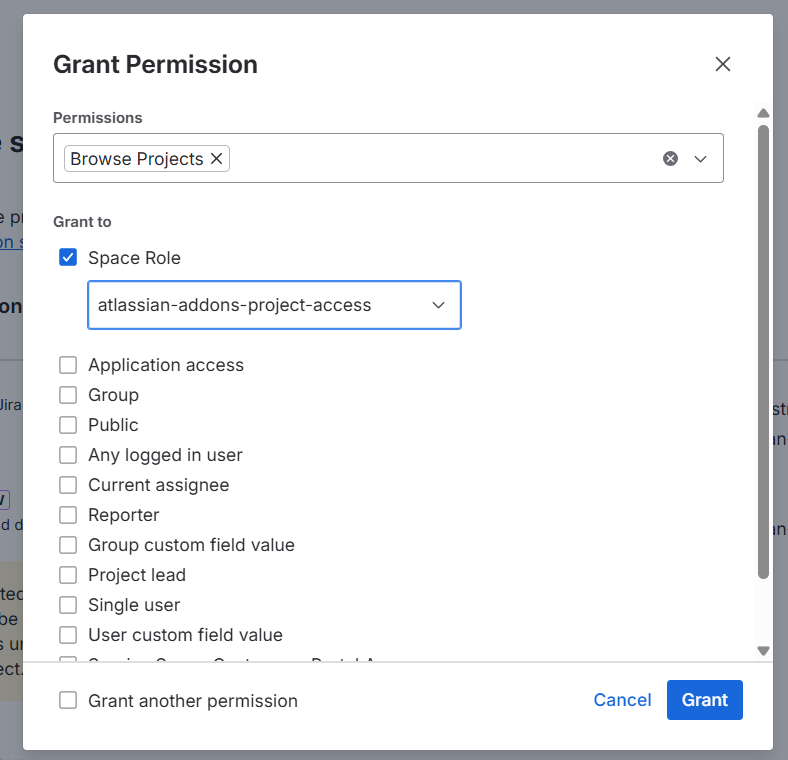
Necessary Project Permissions
Deep Clone for Jira requires the following project permissions:
|
Permission name |
Deep Clone feature requiring it |
|---|---|
|
Assign Issues |
Setting assignee in created clone work items |
|
Browse Projects |
Accessing and editing created clone work items |
|
Create Attachments |
Cloning attachments |
|
Create Issues |
Creating clone work items |
|
Edit Issues |
Editing created clone work items (some fields can only be edited after the work item has been created) |
|
Link Issues |
Cloning work item links and adding a link between the original work items and created clone work items |
|
Manage Watchers |
Cloning issue watchers |
|
Modify Reporter |
Cloning issue reporter |
|
Manage Sprints |
Cloning sprints |
|
Schedule Issues |
Cloning issue sprint |
|
Transition Issues |
Cloning issue status |
|
Work On Issues |
Cloning work logs |