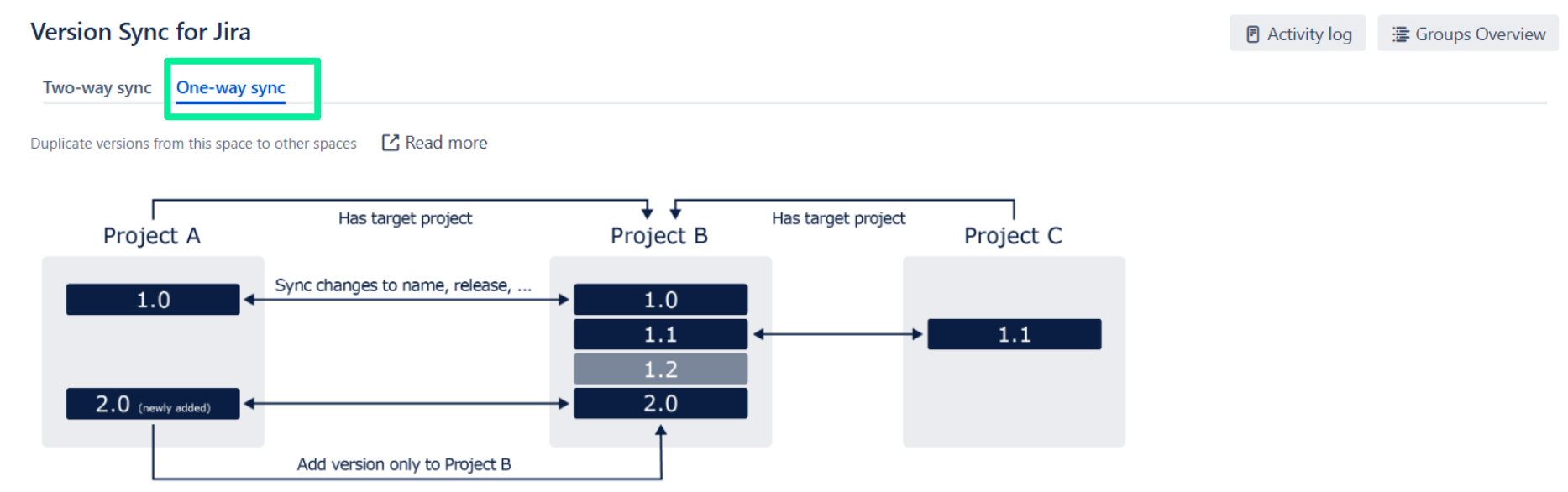
A one-way sync is a directed sync from a source/master space to one or more target spaces.
Use case: If you have two development teams working on different spaces and a QA team supporting both development teams, you can create a sync group with two source spaces (Dev1 and Dev2) and one target space (QA).
If you update an existing, synced version (e.g. change its name), it doesn't matter if you edit it in the primary or a source space. In both cases, the changes are made in all spaces.
-
Go to Version Sync in Space A: Space settings > Apps > Version Sync
-
Click the One-way sync tab at the top of the screen
-
Click Add Target Space and select a target space
-
Select the versions you wish to sync
-
None, don’t synchronize/rename: The version doesn’t get synchronized
-
Create/synchronize version: The version gets created and synchronized in the target space
-
Versions name: The version already exists in the target space and gets synchronized
-
-
Add target space
Restrictions on Adding Target Spaces
For a space to be added as a target, one of the two following conditions needs to be fulfilled:
-
The target space does not belong to any sync group (either two-way or one-way)
-
The target space belongs to a one-way group as a target (source spaces cannot be targeted)
Also, your account needs to have the Browse Projects permission in the target space.
You can see the groups already configured by clicking on the Groups Overview button.
Read More