Clone entire Jira spaces (projects) with Space Clone in Deep Clone for Jira. Simplify project duplication and ensure consistency across spaces.
With Deep Clone you can clone a Jira Software, Jira Work Management, or Jira Service Management space, including its
-
Work items
-
JSM Customers (To avoid unnecessary notifications, follow this guide)
-
Other settings
Company-managed spaces can be cloned right after installation.
Please follow the instructions under Advanced Space Clone in order to enable cloning of Team-managed spaces (Jira Software and Jira Work Management only).
Cloning a Jira Space (Project)
There are two ways to access the Space Clone functionality:
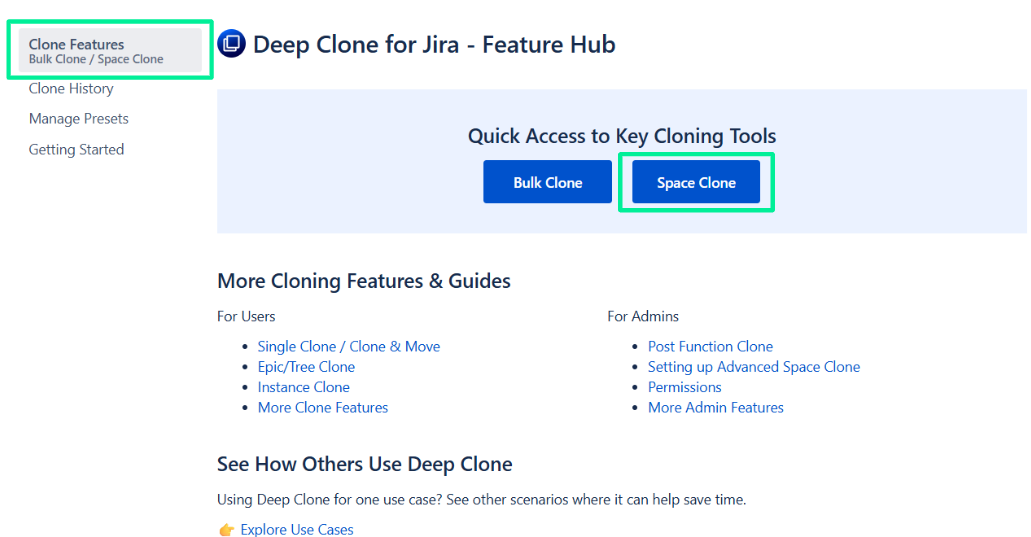
Option 1: Space Clone from the Deep Clone Navigation
-
Select Apps > Deep Clone for Jira on the main sidebar on the left
-
Click Space Clone in the header of Clone Features page.
Option 2: Space Clone from the Bulk Clone dialog
-
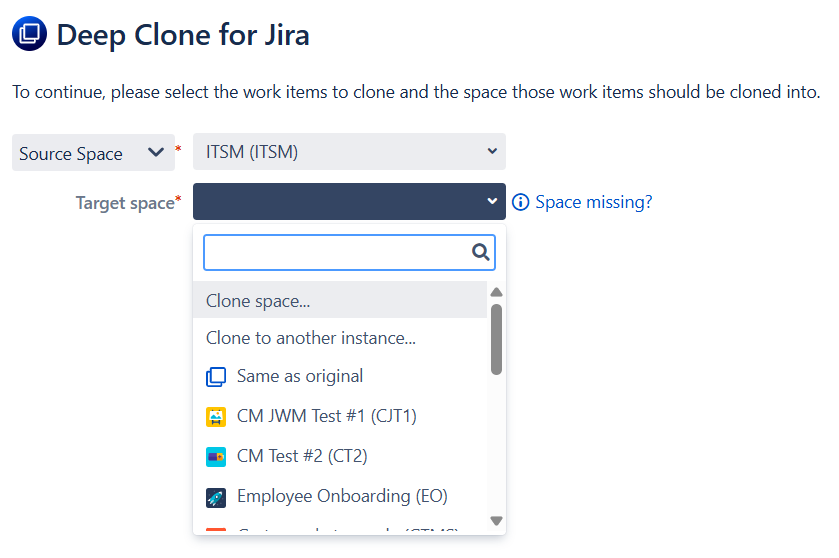
Open the Bulk Clone dialog.
-
When configuring your Bulk Clone, choose Clone space … as the Target space.
Cloning a Space
-
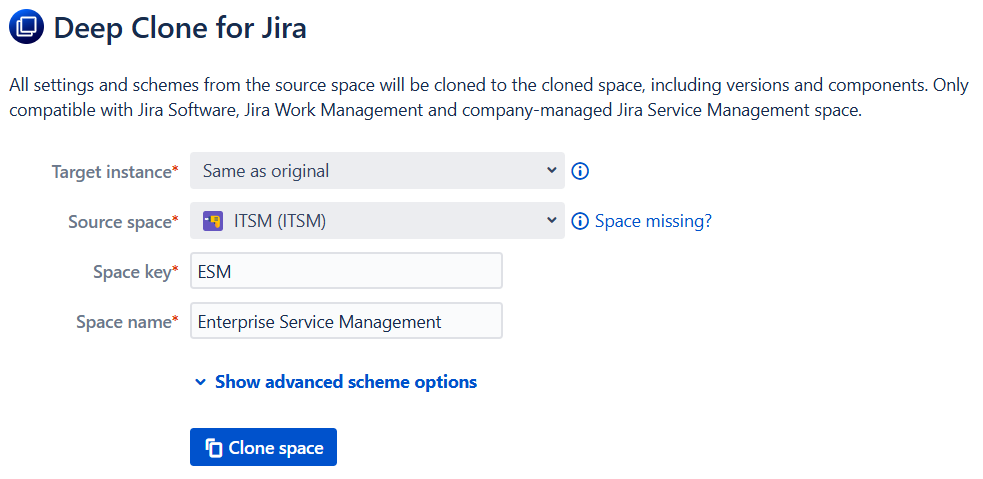
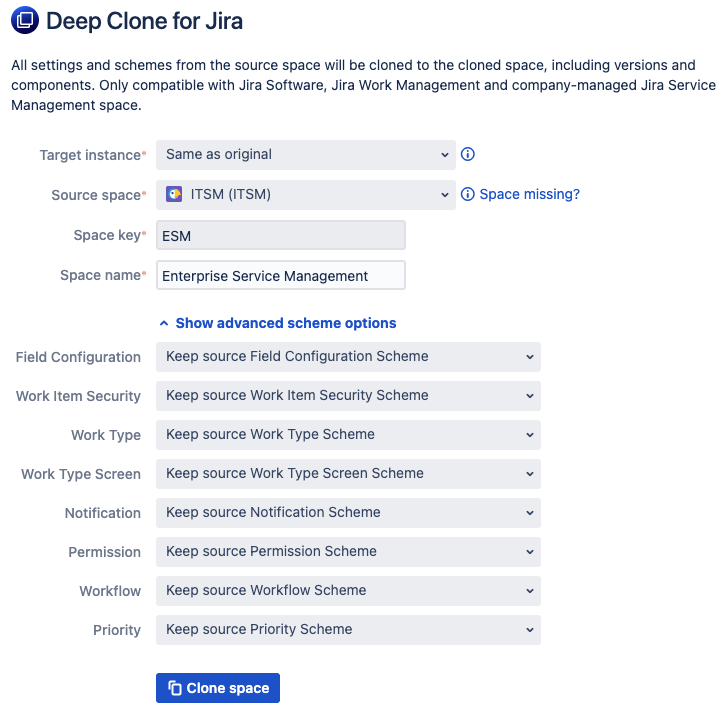
You can now select the Source Space where those settings should be cloned from, including the source key and name for the new space.
-
Once you confirm with Clone space, the new space will be created. No work items have been cloned yet.
-
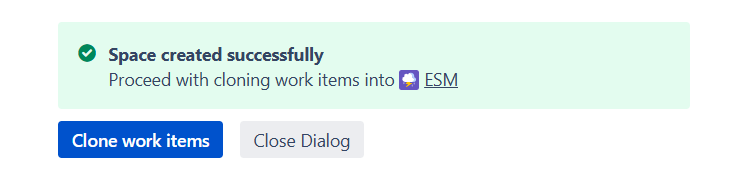
You can proceed to clone work items into the new space by clicking on Clone work items. After that, you can clone all work items of the source space into the newly created space or pick other work items that should be cloned. You can also click Close Dialog and leave the new space empty.
Advanced Scheme Options
When cloning a company-managed space, you can specify the schemes that should be associated with the created space.
Supported scheme types
The scheme types supported are the following:
-
Field Configuration scheme / Field Scheme
-
Work item Security scheme
-
Work Type Scheme
-
Work Type Screen Scheme
-
Notification Scheme
-
Permission Scheme
-
Workflow Scheme
-
Priority Scheme
The Permission Scheme option is only available on Jira Premium instances
Available clone options
For each scheme type, there are three kinds of options available:
-
Keep source scheme
-
This will simply associate the target space with the scheme used by the source space
-
-
Clone scheme
-
This will clone the scheme from the source space and associate the target space with the created scheme
-
Underlying entities, for example Workflows in Workflow Schemes, will also be cloned
-
-
Use a different scheme
-
Associate the target space with any scheme from the Jira instance
-
This option is only available to Jira administrators, since regular users are not allowed to see all the schemes of the Jira instance.
-
Advanced Space Clone
Advanced Space Clone allows you to clone team-managed spaces.
In order to do this, we need to use internal Jira APIs that are usually not available to apps like Deep Clone. For this, we need an API key with the following criteria:
-
The account needs the Administer Jira global permission.
-
Create API key without scopes.
-
Set the key expiration to 1 year to avoid frequent need to create a new key.
Please navigate to in the top navigation bar to ⚙️ Settings > Marketplace apps > Deep Clone for Jira > Advanced Space Clone to get started. There you can enter the account’s email address and the generated Jira API token.
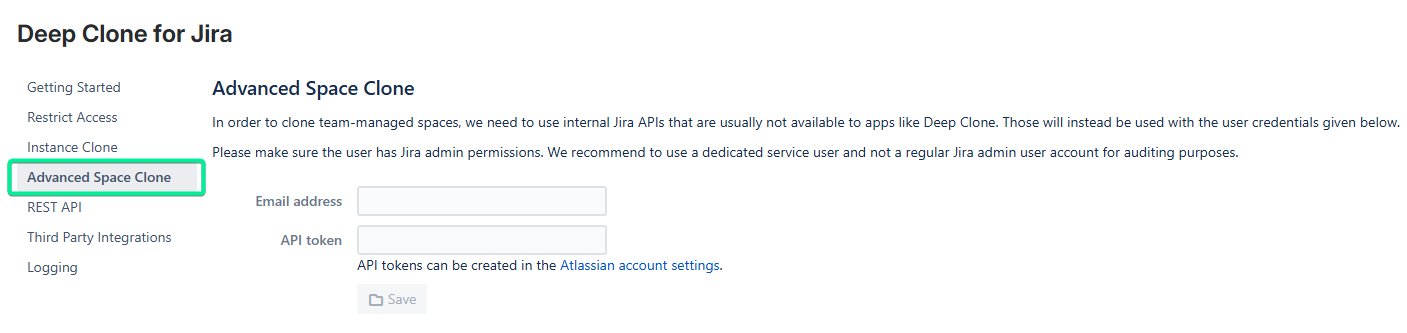
Afterward, Deep Clone is able to clone team-managed spaces.
Advanced Space Clone Limitations
Team-managed spaces:
-
Team-managed Jira Service Management (JSM) spaces cannot be cloned yet.
-
Cloning board configurations is not yet available for team-managed spaces.
-
Cloning Jira automation rules is not yet available. You can read more about sharing automation rules across spaces in the Atlassian community.
-
Workflow transition rules may have work items after cloning, e.g., when using roles in the “Restrict who can move an work item” rule.
-
Some workflow rules are incomplete after cloning and might miss references to roles, statuses or custom fields. The workflow rules are shown with a
sign in the workflow chart.
-
When cloning to another instance, the default value of
Priorityfields won’t be cloned.
Space Clone Limitations
-
Team-managed spaces can only be cloned when the Advanced Space Clone is enabled. If you don’t want to enable the Advanced Space Clone, you can use the following workarounds:
-
Create the space manually and clone all work items using Bulk Clone afterward.
-
Follow these instructions to add boards after cloning the space.
-
-
Board configurations for company-managed spaces can sometimes not be adjusted automatically, e.g., if the board filter JQL does not include the space key of the source space.
If the owner of the board filter doesn’t have the Administer Jira global permission, the filter will be cloned with the default sharing permissions. You can change these under Settings ⚙️ > System 🖥️ > Default user preferences > Default sharing for filters and dashboards.
Please check your board/filter after cloning and make sure users that should have access.
-
Company-managed Jira Service Management spaces cannot be cloned entirely, and the following entities don’t get cloned:
-
Request types, Forms, and External resources
-
Customer permissions and notifications, language support, email settings
-
Portal, widget, and chat settings
-
Knowledge base links and SLA settings
-
-
Cloning Jira automation rules is not possible at the moment. You can read more about sharing automation rules across spaces in the Atlassian community.
-
Category field can’t be cloned. Due to changes on Atlassian's site, the Category field can normally no longer be changed by third-party apps.
At the moment, Atlassian is able to unlock the Category field on a customer site basis, which needs to be requested by the site admin to our Product team. This however might have some consequences for data integrity and potentially corrupt the site. Please have your site admin contact Atlassian Support if you need Deep Clone for Jira clone the Category field.
-
Cloning work item layouts is currently not possible for Deep Clone:
-
This is a technical limitation of Jira Cloud. You can vote and watch a Jira feature request here.
-
While we clone work item screens, it is not possible to clone the work item layout you have configured in one space to another space.
You can copy the layout manually (in company-managed spaces) to your target space using the Jira function under Space settings > Layout > Edit work item layout > Copy work item layout.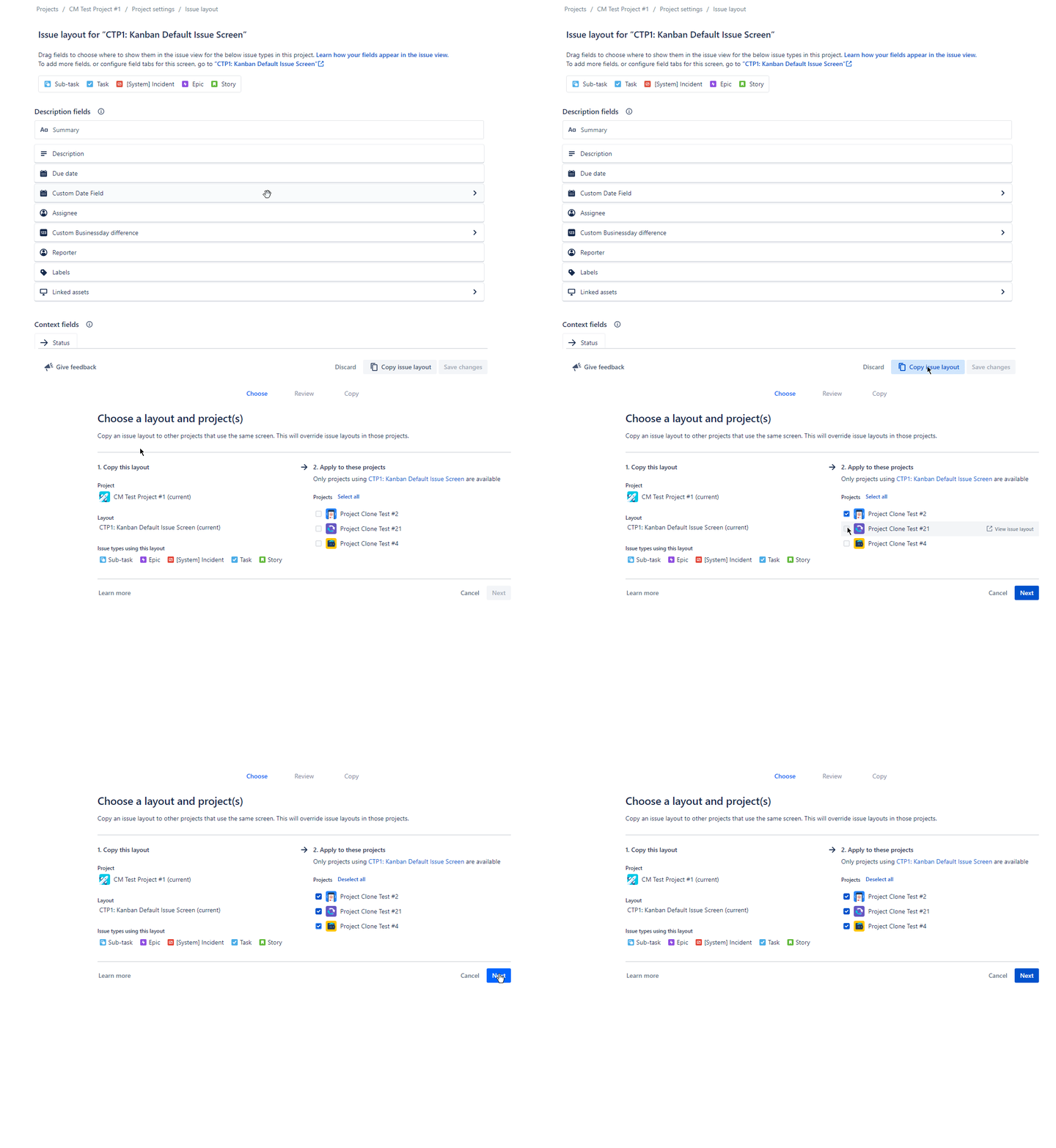
-
We are not able to clone work item layouts because the work item layout is not accessible via REST API. You can vote and comment to let Atlassian know if you need this feature.
-
When cloning spaces across instances boards can’t be cloned, due to limitations of the Jira API.
Permissions
By default, only Jira administrators can use Space Clone, since creating company-managed spaces requires administrator permissions. However, you can extend or restrict permissions for Space Clone using the Deep Clone for Jira - Space Clone global permission:

In addition, only logged-in users can use Deep Clone on spaces that they have the Browse space permission.
Read more about Deep Clone permissions
Learn more about Space Clones