
This documentation is intended for Marketplace Partners who want to integrate Deep Clone with their Marketplace App, as well as for Deep Clone for Jira users looking for ways to make Deep Clone work with other Marketplace apps.
Deep Clone for Jira enables Jira users to clone single or multiple work items, work item hierarchies, and entire spaces within and between Jira cloud instances.
This guide outlines the main integration options and links to the relevant documentation.
When to Integrate Deep Clone
It may make sense to integrate Deep Clone with another Marketplace App if:
-
Users want to replicate a set of work items or spaces that are part of a Marketplace App.
-
Users want to clone work items or spaces including data stored by a Marketplace App.
Integration Options
1. Open Deep Clone from within a Marketplace App
If your app can provide a JQL query or an Issue ID, you can use it as the source for cloning.
This works for Single Clones, Bulk Clones, and Epic/Tree Clones.
The dialog that opens during this process (described below) also allows users to clone entire Jira spaces and clone to another Jira instance.
Users can manually copy and paste the JQL into the Deep Clone for Jira dialog. For a smoother experience, the Marketplace App could provide a UI element that opens the Deep Clone dialog directly with the correct Source JQL pre-filled.
How to open the Single or Epic/Tree Clone dialog from your app
How to open the Bulk Clone dialog from your app
2. Clone Work Item Data
Deep Clone is able to copy work item properties (issue properties). If your app stores data in work item properties, Deep Clone is able to clone this data. Just make sure “Clone work item properties” is checked in the clone dialog.
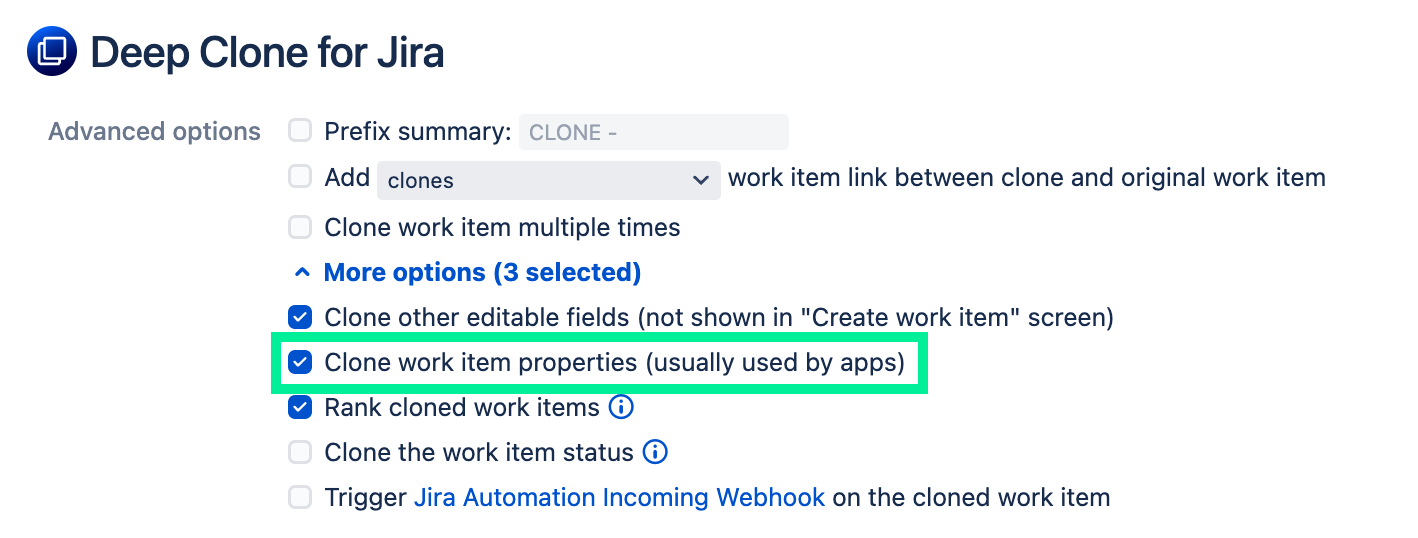
If Deep Clone cannot clone data from your app, please reach out to our team for support.
3. REST API Integration
For programmatic control, use the Deep Clone REST API. You can trigger single, bulk, or space clones from scripts or Jira Automation.
4. Jira Automation Integration
Deep Clone can also be integrated with Jira Automation. This can either be done using a Deep Clone Jira Automation Action, or via a Deep Clone Workflow Post-Function together with (global) looping transitions. This documentation explains both integration options.
If your app already works with Jira Automation, your customers can trigger clone operations without any additional technical integration.
Read more about Deep Clone for Jira integrates with other apps
Why integrate with Deep Clone for Jira?
-
Leading cloning solution on the Atlassian Marketplace
-
Can clone single work items, bulk sets, or entire spaces
-
Maintains work item hierarchies
-
Can clone across Jira spaces and instances
-
Supports cloning up to 100,000 work items in one operation
-
Outstanding success rate with detailed logs