
We are committed to the Forge platform for “External Data for Jira Fields” and have closed the functionality gap in the main app that required the Extension App.
Since existing Extension Fields cannot be copied automatically, use this guide to complete your transition from the Extension App.
Migrated fields will be new custom fields, allowing you to migrate or test without disrupting production. After migration, switch to the new fields.
Before you start
-
Identify all Extension Fields to migrate. In “Field Configuration,” look for fields with type:
-
Extension Search
-
Extension Search External
-
Extension Info Panel
-
Extension Asset Field
-
-
Understand dependencies among Extension Fields before starting.
Step 1 - Create new Custom Fields
Use Jira UI “Settings > Work items > Fields” or the App section “Manage Jira Fields”
For each field to migrate, select “+ Add Custom Field” and choose the correct Field Type
|
Extension Field |
|
Main App Field |
|---|---|---|
|
External Data Extension - Search Field
|
-> |
External Data - Search Field
|
|
External Data Extension - Search Field (Multiple Choice)
|
-> |
External Data - Search Field (Multiple Choice)
|
|
External Data Extension - Info Panel
|
-> |
External Data - Info Panel
|
|
External Data Extension - Asset Field
|
-> |
External Data - Asset Field
|
Step 2 - Duplicate field configurations
In the “Field Configuration” section, for each existing extension field configuration:
-
Create a new field configuration by selecting the Duplicate icon.

-
Verify that
customfieldreferences in Context Filter and Data source Variables remain valid. This is crucial if the field depends on another Extension Field.
-
Change the Target Jira Field to the new field from Step 1
Step 3 - Copy Historical Data
After creating the new custom field and field configuration, copy all values from the extension field to the new main field using an action
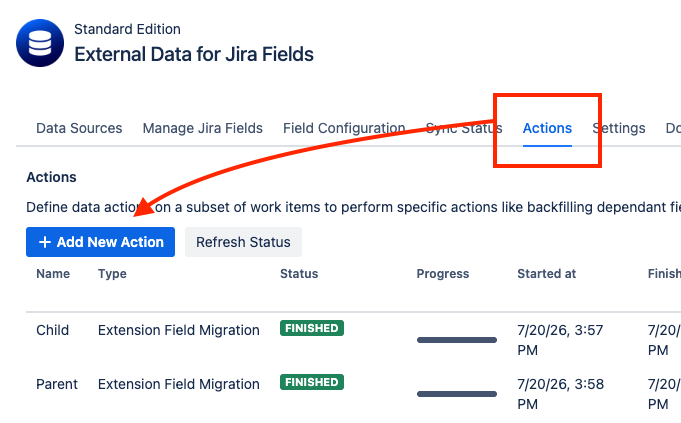
In the “Actions” section, for each extension field:
-
Create a new data action “+ Add New Action”.
-
Select Extension Field Migration
-
Select Extension Field Configuration, the field configuration to copy values from.
-
Select Main Field Configuration, the field configuration to copy values to.
-
Select the appropriate Update Behaviour:
-
Only if Empty: Copies the value from the Extension Field only if the Main App Field is empty. Existing values in the Main App Field will not be overwritten.
-
Always: Copies the value from the Extension Field to the Main App Field, even if the Main App Field already contains a value. Existing values may be overwritten.
Use a JQL Query like “project=DEMO” and verify with Test JQL
-
-
Enter a JQL Query, such as
project = DEMO, to select the work items you want to migrate. Click Test JQL to verify the query. -
Save the Data Action.
-
When Extension Fields have dependencies, create a Data Action for each parent field before running the data action for its child fields. The dependency mapping derives from existing data actions.
-
Remove any test data Actions that might disrupt the field mapping from extension fields to main app fields.
-
If you want to preserve values that already exist in the new Main App Field, select Only if Empty.
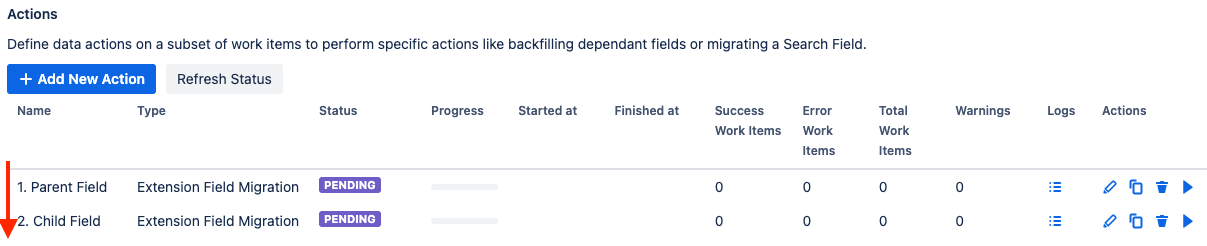
Once everything is configured, run the Data Action by clicking Play ▶️ to start migrating the field values.